Petrified
Petrified is an on-rails shooter where you play as a witch. Ride your broomstick, dodge rocks, and sling orbs at elementals to save the forest from petrification.
We made the game in Zap, a custom engine developed by students prior to and during the project. The engine features a comprehensive editor, enables scripting through AngelScript, and exports to both Windows and PS5.
Key responsibilities
- Designed and balanced a 2-phase boss and its 4 attack types
- Designed and balanced 2 enemy types and their 8 movement patterns
- Developed an in-editor tool for collecting and visualising telemetry data
- Co-ran playtests and supported our team’s QA processes
- Collaborated with programmers, artists, and our level designer to create meaningful challenge for the player
Boss design
We wanted our level to end on a high note with an intense boss fight. To tackle it, we formed a small feature team consisting of me as the designer, one gameplay programmer, and our two artists handling the character and VFX.
Research
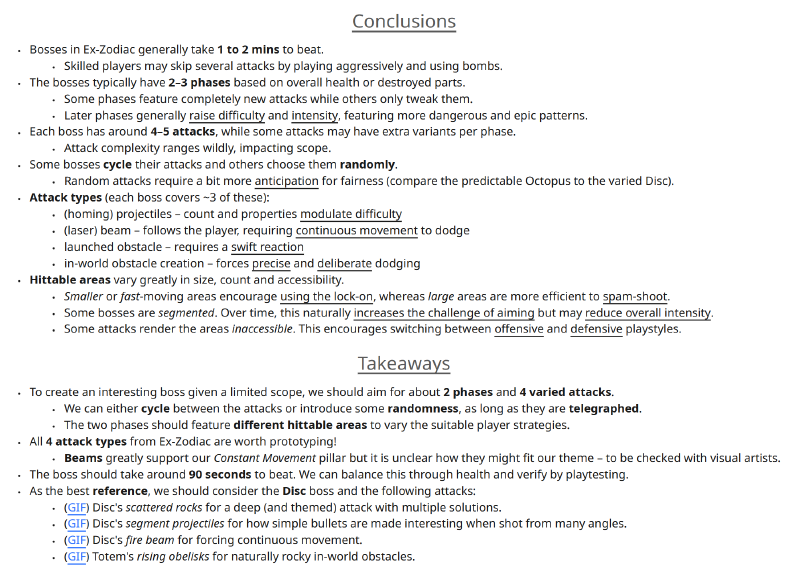
Initially, it was unclear what kind of attacks our boss should have. To help answer this, I briefly researched bosses from our primary reference game, Ex-Zodiac.
I timed 8 boss fights, broke down their attacks and phases, and took notes on which parts could work well for our game.
This helped me identify 4 common types of boss attacks worth exploring: projectiles, beams, launched obstacles, and in-world obstacles. The data also led to a sensible scope for an engaging boss: 90 seconds of combat across 2 phases and 4 varied attacks.
The conclusions enabled me to make confident decisions over the boss’s concept and gave the programmer a clear direction for what to prototype.
Concept
Several ideas for the boss emerged from an artist’s concept sketches and the programmer’s early prototypes. We went back-and-forth with the programmer to explore different attack patterns, and soon we landed on a compelling set of attacks. However, the prototypes were still loose and it was unclear how they should connect. My goal became to turn our ideas into cohesive 2-phase boss.
I established a target intensity curve to effectively engage the player throughout the fight (with a rising intensity and frequent fluctuations). I also wanted to encourage the player to switch between their two weapons – to solve this, I opted for varying the boss’s hittable areas (both small and large). Another aspect I considered was how different attacks allow for the player to play aggressively or force them to defend themself.
With these objectives in mind, I rated our attack types and mapped them to the two phases. This way, each phase had an intense signature attack and two other attacks that grew in challenge.
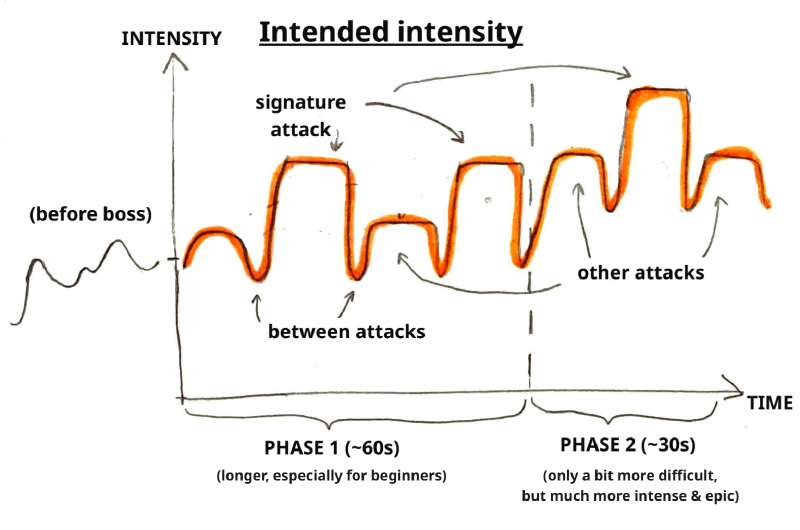
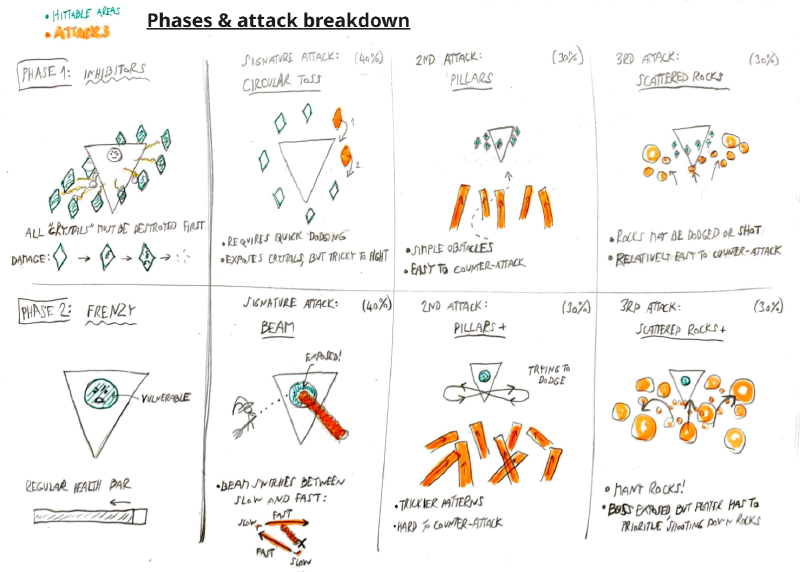
I made sure to check the concept with our feature team. Importantly, the boss relied on several feedback systems, which I discussed with visual artists. The concept was well received and established clear intentions for each attack which could be verified during playtesting.
Balancing
The initial parameters of the boss prototype did not align with the intended player experience for the concept. Instead, I continuosly balanced the properties over 4 iterations based on playtests and my own playthroughs.
The biggest issue was with the boss’s pacing – the boss is supposed to be the most intense part of our level. I reduced the boss’s health to reach the target duration, and shortened the attacks and delays between them to maximise action. The exception was the laser beam attack, which I prolonged to motivate the player to both dodge and counter-attack.
Reviewing recordings from our first playtest confirmed the boss phases last the intended 60s and 30s. Another success was with the players’ weapon use – lock-on was preferred in the 1st phase and firing bullets in the 2nd, as expected.
However, most testers found the 2nd phase easier than the 1st. To avoid an anticlimactic ending, I further shrunk delays in the 2nd phase. Based on how testers rated intensities of the individual attacks in a survey, I continued to tweak them to highlight the signature attacks and tougher variants.
Enemy design
Designing enemies was my primary responsibility this project. I worked on them in a feature team together with 2 to 3 programmers and both of our visual artists. I designed the enemy types and behaviours, and worked closely with the level designer who used them for combat.
Feature specification
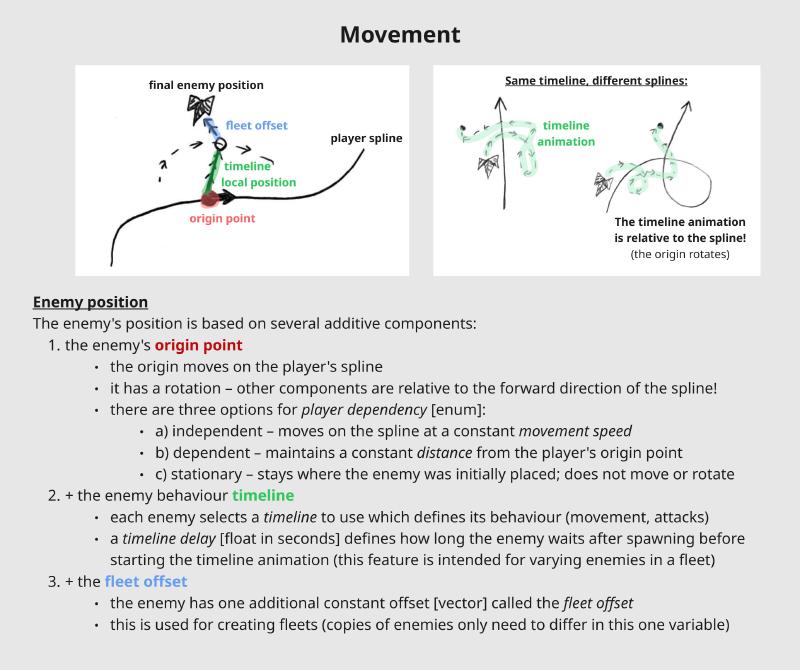
To utilise our team composition, programmers handled most of the gameplay implementation. My task was to figure out what functionality our enemies should have, and then specify it so programmers knew what to work on. An important consideration was making sure enemies are easy to tweak and experiment with for both myself and the level designer.
I started with some quick research into on-rails shooters. This let me identify what key elements should be tweakable for modulating difficulty: the complexity of enemy movement, number of fired bullets, and whether they come in fleets.
Based on the findings, I started mapping down the functionality in a document. This required a very iterative process, keeping in close touch with programmers. Especially at the beginning, I had to update them frequently to avoid design becoming a bottleneck. There also turned out to be several unclarities, which led me to refine the documentation and adjust my process to be more descriptive. I also found it helped to check for understanding by asking others to paraphrase.
The updated specification was well received, and the resulting feature made it easy to create content (described in the following sections).
Enemy types
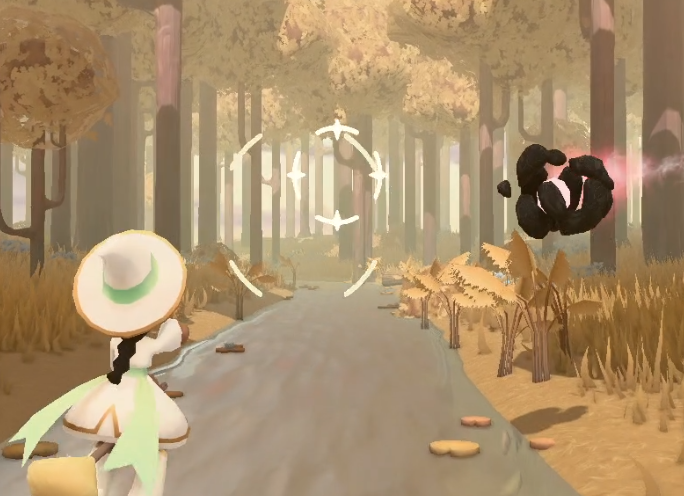
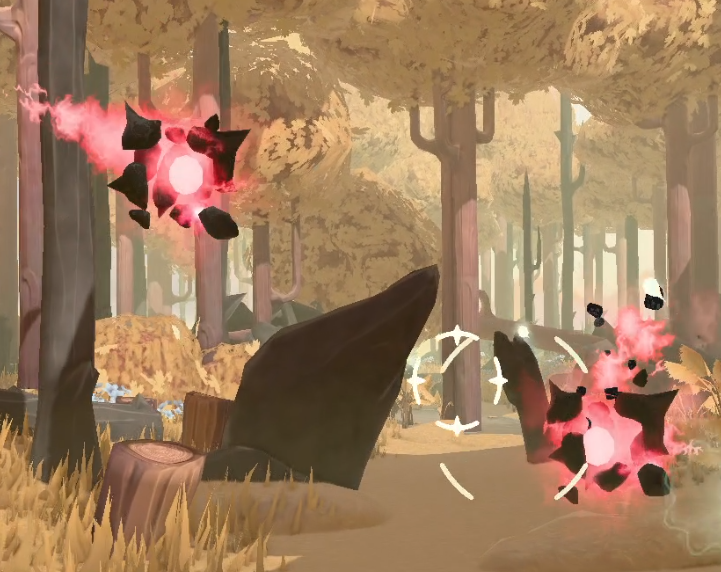
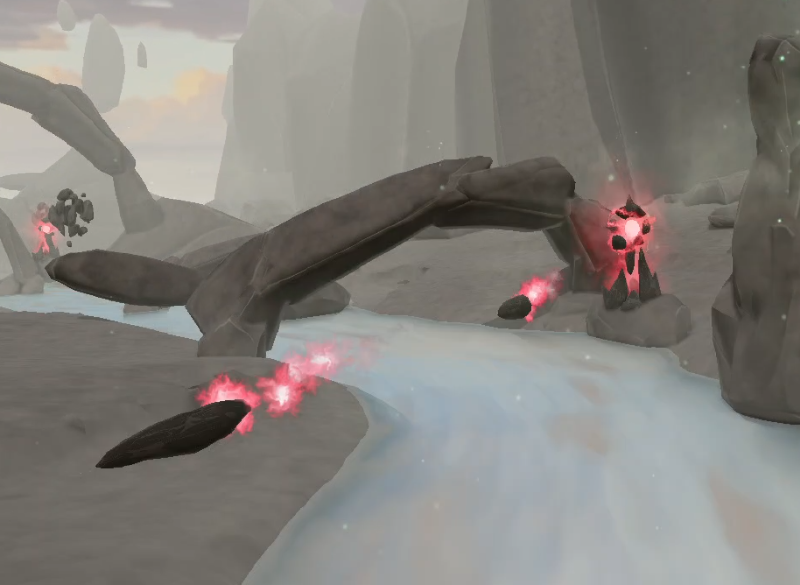
Balancing variety with the limited scope, we settled on having 2 enemy types – flying & stationary.
In a playtest I co-ran, testers found enemies easy to avoid and rarely threatening. To address this, I reduced the bullet anticipation, requiring a swift reaction from players. I also made the stationary enemy fire multiple bullets to provide a distinct challenge.
It was important for our artists to have metrics for enemies locked in early. I used feedback from build reviews to find the right sizes and updated the artists. Another consideration for visual art was communicating to the player which enemies are passive and which are going to shoot – we discussed this and opted for having 2 variants.
Attack patterns
In on-rails shooters, players fight many enemies with various attack patterns they can learn and overcome. To support this, I created and maintained a growing library of reusable enemy behaviours for the level designer to build combat with.
There were two kinds of behaviours I created, based on the current priorities:
- aggressive (moving and shooting) – used to threaten the player, especially later in the level
- passive (movement only) – intended for onboarding, as well as to layer combat and give opportunities for extra score
I used a minimal gym environment to set up timeline animations for enemies relative to the player, including shooting events. These timelines, together with a couple more settings, formed the full behaviours as data assets. The exception was a bespoke movement pattern made for a specific point in the level, which I defined using a spline.
While a few experiments were scrapped, a total of 8 behaviours made it to the final level (some appearing many times).
Telemetry system
Motivation
The player moves on a spline, and as such the game is a fully linear experience with well-defined pacing. Knowing in which sections players struggle and how they navigate around obstacles could prove very useful, especially for the level designer.
To utilise this opportunity, I proposed and developed the telemetry system – a script to collect playthrough data, together with an in-editor tool to visualise it. I worked on this alone on the side under a low-priority goal.
Development
An interesting technical challenge was working around gaps in the engine’s functionality. Core gameplay was our team’s priority, and so we did not have features like game saves or HTTP requests until later in development. I wanted us to start collecting telemetry data as soon as possible, so I made do with what the engine allowed.
The solution I came up with was dumping the telemetry data to our game’s logs, following a simple text-based format. I could then scrape the logged data with a Python script. To enable easy aggregation across multiple playtest sessions, I used my PHP server, storing the metrics in a database and allowing us to download a synthesized data asset. Finally, I could read all this data in AngelScript and visualise it in the editor through debug draws.
The telemetry code was not very well optimised, and so it was important that the telemetry system could easily be switched off and that gameplay logic would not be dependent on it. To achieve this, I utilised delegates (called ZapEvent in our engine) like in the example:
void Start()
{
    /* subscribe to the player */
    m_player.GetComponentInChildren<HealthComponent>().onDamage
        .AddListener(ZapEvent<HealthComponent>::CallbackType(PlayerDamaged));
}

private void PlayerDamaged(const HealthComponent&in healthComponent)
{
    playthrough.AddPosition(TelemetryType::PlayerHurt, m_playerTransform.GetWorldPosition());
}
Results
We used the telemetry system to collect data during various playtests, but by far the biggest dataset was from visitors trying the game at the Night of the Nerds (an event in Eindhoven), totalling 166 playthroughs. Use of the tool to visualise this data can be seen below:
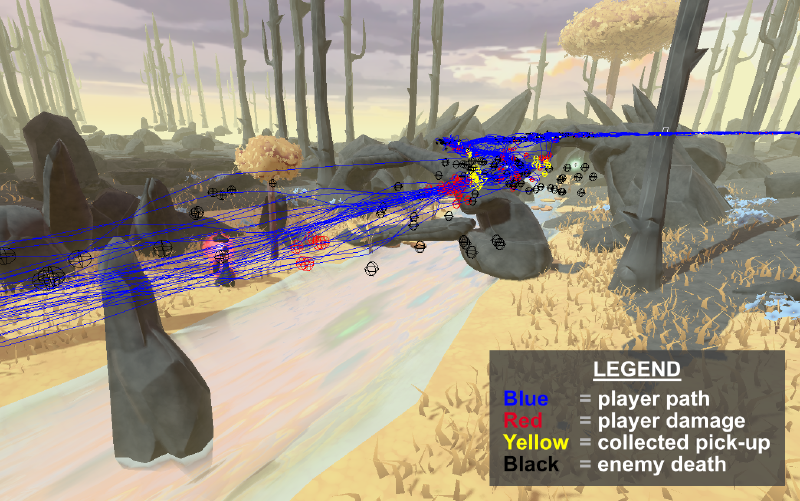
The most useful information were player paths and where players took damage – reviewing the data with the level designer allowed us to quickly check for pain points. Due to the project’s short duration, there was unfortunately not much room to iterate based on these findings, but the learnings from the development were certainly worth it.
Conclusion
From what worked well and what went poorly, these are my biggest take-aways for this project:
- Collaborating with programmers – Specifying enemies, I learned that communicating functionality requires descriptive language and checks to prevent misunderstanding. Designing the boss taught me another kind of collaboration – constant back-and-forths with a programmer through prototypes allow for rapid exploration and iteration.
- The build is key – We started the project developing features in separation, which carried risks for gameplay. Introducing daily build reviews led us to exchange lots of feedback and prioritise connecting features as soon as possible, maintaining a playable build.
- Functionality testing – Based on research into QA practices, I set up a part of our team’s testing pipeline. From the processes, functionality test suites proved particularly valuable, allowing us to confidently ship frequent updates to the game.
- Improving workflows – Watching and asking about the level designer’s workflow, he was placing frames along the spline to visualise player bounds and distances. Thanks to this, I saw an opportunity to help and scripted a tool to automate and customise the process.
“Tony is a reliable teammate who doesn’t shy away from cooperating with teammates to ease their workflows, helping them speed up implementation and iteration time”